Free public beta · 0.2.0-beta.14

Compose for the Monotype caster you already have.

Typomatix turns text, matrix-case arrangements and wedge data into an inspectable casting plan. It does not require a new caster or proprietary hardware: compose, justify and audit instructions for a traditional punched-tape workflow or an independently built electronic caster interface—or use it without a machine to teach and study Monotype composition.

No new caster required · Windows 10/11 x64 · macOS Apple Silicon or Intel / Big Sur

JOB / 001READY
30EM MEASURE
MCA01 · Viljandi Regular
WEDGES5
BODY12 pt
SET11.75
OUTPUTAudited machine-code planready for the operator's chosen interface

A visible machine model

The line is no longer a black box.

Typography, physical widths and machine signals remain connected from input to casting instruction.

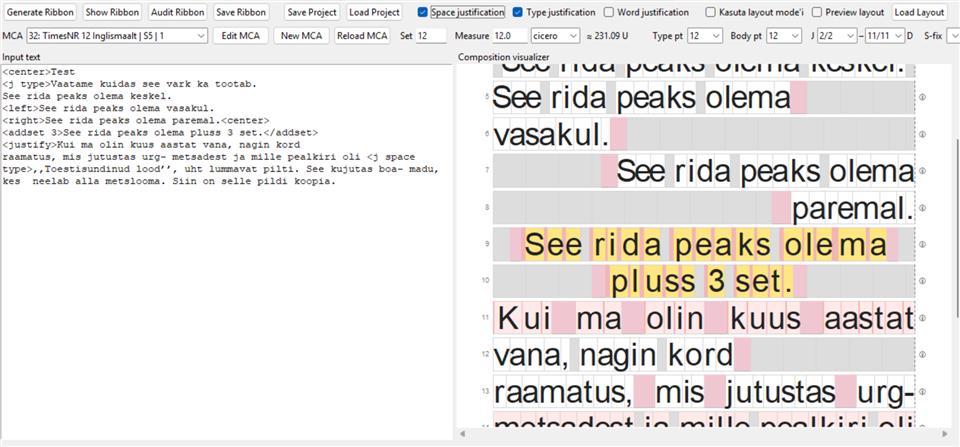
Typomatix showing input text beside a line-by-line Monotype composition preview
Composition preview with alignment, justification and fixed-space diagnostics.

Beyond composition

Plan the page. Divide what the caster cannot cast at once.

Typomatix connects the line measure to the finished page, while Split handles work whose physical width exceeds the available machine output.

01 / LAYOUT

See the composition as pages.

Set up A4, A5 or a custom page; define text height, measure and margins; place page numbers; and reserve image areas with text clearance. The all-pages preview shows how composed lines flow before you export a vector, print-ready PDF.

  • Millimetres, inches, cicero, pica or points
  • Top, inner and calculated outer margins
  • Placed images with fit, fill and focal-position controls
  • Print-ready vector PDF output

02 / SPLIT

One wide line, several castable parts.

If a composed line is wider than the caster can deliver, divide it into two, five—or as many as six—physical sections. Set the required widths, let Typomatix calculate the final part, then analyze every division before generating separate machine instructions.

  • Choose 2–6 parts with a defined width tolerance
  • Prefer natural character or space boundaries
  • Generate, inspect, audit and save each part separately

Example80 em composition→20 + 20 + 20 + 20 emfour separately cast sections, preserving the full line

For existing Monotype casters

Keep the caster. Choose the interface that suits it.

Typomatix prepares and checks composition data; the operator keeps control of the existing caster and selects the hardware that carries its signals.

USB · 31 pneumatic channels

Welliver interface

Bill Welliver's system replaces the paper ribbon at the tower with an air-bar adapter. A USB interface board drives 31 solenoid valves and reads a cycle sensor, allowing a computer to send the caster the pneumatic signals it expects without modifying the caster itself.

Read Bill Welliver's system description ↗

Łódź · independent controller

Keritech / Keri Szafir

At the Book Art Museum in Łódź, Keri Szafir developed another electronic controller around 31 valves, modern embedded electronics and computer control. It is a separate practical route from digital composition data to the caster's pneumatic inputs.

Read the builder's account ↗

These systems are independent projects. Typomatix does not imply affiliation or automatic plug-and-play compatibility; its role is to make the composition and resulting machine instructions explicit, inspectable and adaptable.

From copy to caster

One continuous workflow.

01

Compose

Set type to a physical measure with Monotype set, wedge and matrix-case data.

02

Inspect

See every cast, space and correction before the job reaches the caster.

03

Connect

Generate and audit machine-code instructions for punched-tape or electronic-interface workflows.

04

Preserve

Import and edit MCA definitions, keep projects, and export composition proofs as vector PDF.

Free public beta

Free to download, use and learn with.

Typomatix is available at no cost for practical production and purely educational use. Study Monotype composition without operating a caster, or take a real job through layout, split planning, machine instructions and print-ready PDF output. Beta 13 corrects 16×17 Unit Shift addressing: D is used automatically only when the entered U value belongs to the preceding row rather than the matrix's own row. It also includes verified Windows polytonic Greek input and Unicode-safe MCA content.

Free beta downloads · version 0.2.0-beta.14

Windows 10/11x64 installer
macOS Apple SiliconARM64 DMG
macOS Intel / Big Surx64 DMG
Unsigned beta installers

These builds are not yet code-signed or notarized. Windows may show a SmartScreen warning; select More info, then Run anyway only after confirming the file's SHA-256 below. On macOS, control-click the app in Finder and choose Open after confirming the checksum.

SHA-256Windows · C249F8DDC13600F3C9A47910221F1667084BC67FBA3F57ABF46DF6060C1EDC82macOS Apple Silicon · 1859434BEC293D282BC8B4FA0656A1C1399548361FDDAA520BB26BD045BB1D86macOS Intel / Big Sur · C8ADBEB9C432943A49A8108E5F7CB30A2AA9FB3F28C43D3CE58799912B48A35B
Beta software: verify the composition and ribbon audit before operating machinery.